Kalshi API Python Tutorial: First Trading Bot in 100 Lines
Kalshi’s v2 API is the best-kept infrastructure advantage in prediction markets. It is fast, well-documented, and lets you do everything the web app does — pull live market data, place limit orders, track positions, and settle contracts — all from a Python script.
This tutorial walks you through the full process: authentication, fetching markets, placing your first order, and wiring it all into a working bot. No prior API experience required.
Why /markets?status=open&limit=1000 Returns Markets With No Bids
If you call GET https://external-api.kalshi.com/trade-api/v2/markets?status=open&limit=1000, you get 1,000 markets back, but almost none of them have a bid. We checked on October 4, 2026: all 1,000 markets on the first page were multivariate combo markets (tickers starting with KXMVECROSSCATEGORY), and 0 of them had a yes_bid_dollars above zero. The host is not the problem. external-api.kalshi.com and api.elections.kalshi.com returned the identical first page.
The fix is one parameter:
GET /trade-api/v2/markets?status=open&limit=1000&mve_filter=excludeWith mve_filter=exclude, the same call returned regular markets (college football spreads and totals, tennis, and so on), and 973 of the 1,000 had a live bid.
Three more rules for bulk market pulls:
limitmaxes out at 1000.limit=1001returns HTTP 400 (failed on the 'lte' tag).- Paginate with
cursor. There are tens of thousands of open markets. Pass thecursorfrom each response into the next request until it comes back empty. - Prices are dollar strings. Read
yes_bid_dollars,yes_ask_dollarsandvolume_fp, not the old integer cent fields.
For a deeper list of API quirks, see Kalshi API v2: 6 Undocumented Traps and the Kalshi API endpoint reference. Once you have a market instead of a thousand, the open interest and order book reference explains what open_interest_fp, orderbook_fp and the bid-only book actually mean, and how far your order size can walk the price.
What You Will Build
By the end of this guide, you will have a working Python bot that:
- Connects to Kalshi’s API and authenticates with RSA keys
- Fetches live market data for any event
- Places limit orders (Maker = lower fees)
- Checks order status and tracks your position
- Runs on a scheduled loop — hands-free
Prerequisites
Before writing code, get these three things ready:
1. A funded Kalshi account. You need a verified account to generate API keys. Sign up here if you do not have one yet.
2. An RSA key pair. Kalshi uses RSA-signed requests for authentication — no API secrets stored in plaintext. Generate your keys:
openssl genpkey -algorithm RSA -out private_key.pem -pkeyopt rsa_keygen_bits:2048
openssl rsa -pubout -in private_key.pem -out public_key.pem
Keep private_key.pem somewhere secure. Never commit it to Git.
3. Kalshi API key.
Go to your Kalshi API settings and register your public key. Kalshi gives you a key_id — save it. You will need both the key_id and the private key file to authenticate.
Note (updated October 12, 2026): the code below is the v1 shape of Kalshi’s API. The host
trading-api.kalshi.comnow answersAPI has been moved to https://api.elections.kalshi.com/, and theKALSHI-CLIENT-*headers no longer authenticate. Current requests use theKALSHI-ACCESS-*headers againstexternal-api.kalshi.com. Full setup, key types and every error code: How to Get a Kalshi API Key.
Step 1: Authentication
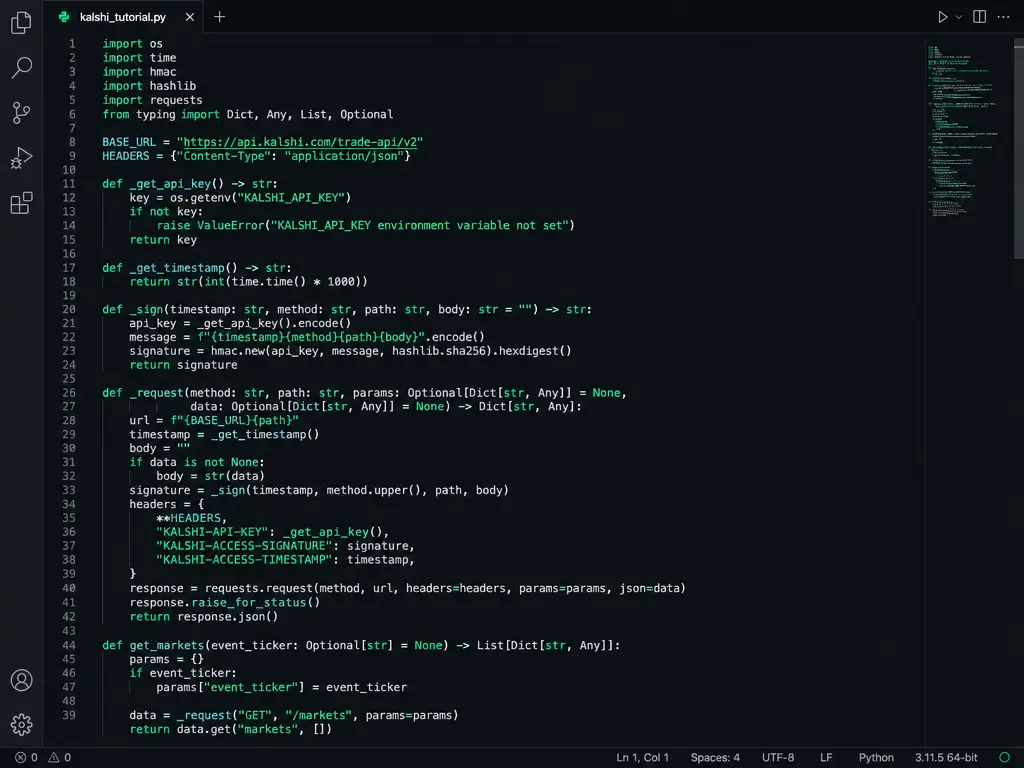
Kalshi’s auth flow uses RSA signing. Every request needs a signed header proving you own the private key matching your registered public key. Here is the complete auth module:
import json
import time
import base64
from cryptography.hazmat.primitives import hashes, serialization
from cryptography.hazmat.primitives.asymmetric import padding
from cryptography.hazmat.backends import default_backend

API_BASE = "https://trading-api.kalshi.com/trade-api/v2"

def load_private_key(path="private_key.pem"):
    with open(path, "rb") as f:
        return serialization.load_pem_private_key(
            f.read(), password=None, backend=default_backend()
        )

def sign_request(method: str, path: str, body: str, private_key) -> dict:
    current_time_ms = int(time.time() * 1000)
    msg_string = f"{current_time_ms}{method}{path}{body}"
    signature = private_key.sign(
        msg_string.encode("utf-8"),
        padding.PSS(
            mgf=padding.MGF1(hashes.SHA256()),
            salt_length=padding.PSS.DIGEST_LENGTH
        ),
        hashes.SHA256()
    )
    return {
        "KALSHI-CLIENT-KEY-ID": "YOUR_KEY_ID",  # Replace with your key_id
        "KALSHI-CLIENT-TIMESTAMP": str(current_time_ms),
        "KALSHI-CLIENT-SIGNATURE": base64.b64encode(signature).decode("utf-8"),
        "Content-Type": "application/json"
    }
Install the dependency:
pip install cryptography requestsExpert insight: Kalshi’s RSA auth is unusual among trading APIs — most use API-key-in-header. This design means your credentials never travel over the wire in plaintext. It is more secure, but the initial setup takes an extra 5 minutes. Worth it.
Step 2: Fetch Live Market Data
Kalshi organizes markets by event ticker and series ticker. Events are things like “Will the Fed raise rates in July?” and series are grouped collections like “Fed Interest Rate Decisions.”
Here is how to pull all active markets:
import requests

def get_markets(headers: dict, status: str = "open", limit: int = 50):
    """Fetch active Kalshi markets with optional filters."""
    path = f"/markets?status={status}&limit={limit}"
    resp = requests.get(f"{API_BASE}{path}", headers=headers)
    resp.raise_for_status()
    return resp.json()

# Usage
private_key = load_private_key()
headers = sign_request("GET", "/markets?status=open&limit=10", "", private_key)
markets = get_markets(headers, limit=10)

for m in markets.get("markets", [])[:5]:
    ticker = m["ticker"]
    title = m["title"]
    yes_bid = m.get("yes_bid", 0)
    yes_ask = m.get("yes_ask", 0)
    print(f"{ticker}: {title}")
    print(f"  YES bid: {yes_bid}¢ | ask: {yes_ask}¢\n")
This gives you the raw data for every active market: bid/ask prices, volume, close time, and settlement rules. You now have everything you need to build a signal.
Step 3: Place Your First Order
Kalshi supports two order types: limit (you set the price, lower fees) and market (instant fill, higher fees). For automated strategies, always use limit orders — the fee savings compound fast.
def place_limit_order(headers: dict, ticker: str, side: str,
                      price: int, count: int, client_order_id: str):
    """Place a limit order on Kalshi.
    side: 'yes' or 'no'
    price: in cents (1-99)
    count: number of contracts (max $1 per contract payout)
    """
    path = f"/portfolio/orders"
    body = json.dumps({
        "ticker": ticker,
        "action": "buy",
        "type": "limit",
        "price": price,       # In cents: 45 = 45¢
        "count": count,       # Contracts to buy
        "side": side,
        "client_order_id": client_order_id
    })
    headers = sign_request("POST", path, body, private_key)
    resp = requests.post(f"{API_BASE}{path}", headers=headers, data=body)
    resp.raise_for_status()
    return resp.json()

# Example: Buy 5 YES contracts on KXBTCD-25JUL at 45¢ each
result = place_limit_order(
    headers, "KXBTCD-25JUL", "yes", 45, 5, "my-order-001"
)
print(f"Order ID: {result['order']['order_id']}")
print(f"Status: {result['order']['status']}")
A few important details:
- Price is in cents (1-99), not dollars. A 45¢ contract =
price: 45. client_order_idis your internal tracking ID. Use it to prevent duplicate orders if your script retries.- Limit orders on Kalshi use Maker pricing — significantly lower fees than Market/Taker orders.
- If your order does not fill, it sits on the book. Check status or cancel it.
Step 4: Check Orders and Track Positions
After placing an order, poll for its status:
def get_order_status(headers: dict, order_id: str):
    path = f"/portfolio/orders/{order_id}"
    new_headers = sign_request("GET", path, "", private_key)
    resp = requests.get(f"{API_BASE}{path}", headers=new_headers)
    return resp.json()

def get_positions(headers: dict):
    path = "/portfolio/positions"
    new_headers = sign_request("GET", path, "", private_key)
    resp = requests.get(f"{API_BASE}{path}", headers=new_headers)
    return resp.json()

# Check if our order filled
status = get_order_status(headers, result["order"]["order_id"])
filled = status["order"].get("filled_count", 0)
remaining = status["order"].get("remaining_count", 0)
print(f"Filled: {filled}, Remaining: {remaining}")
Step 5: Wire It Into a Bot
Now combine everything into a simple loop. This bot checks a single market every 60 seconds and places a limit order when the YES price drops below a threshold:
import time
from datetime import datetime

private_key = load_private_key()
TICKER = "KXBTCD-25JUL"   # Replace with your market
BUY_THRESHOLD = 40         # Buy YES if price drops to 40¢
ORDER_SIZE = 5             # Number of contracts per trade
MAX_POSITION = 25          # Never hold more than 25 contracts

def run_bot():
    while True:
        try:
            # 1. Fetch latest price
            mkt_headers = sign_request("GET", f"/markets/{TICKER}", "", private_key)
            market = requests.get(
                f"{API_BASE}/markets/{TICKER}", headers=mkt_headers
            ).json()["market"]

            yes_bid = market["yes_bid"]
            yes_ask = market["yes_ask"]
            print(f"[{datetime.now().strftime('%H:%M:%S')}] {TICKER}: bid={yes_bid}¢ ask={yes_ask}¢")

            # 2. Check current position
            pos_headers = sign_request("GET", "/portfolio/positions", "", private_key)
            positions = requests.get(
                f"{API_BASE}/portfolio/positions", headers=pos_headers
            ).json().get("positions", [])
            current_position = sum(
                p["position_count"] for p in positions if p["ticker"] == TICKER
            )

            # 3. Trade if conditions are met
            if yes_ask <= BUY_THRESHOLD and current_position < MAX_POSITION:
                print(f"  → Buying {ORDER_SIZE} YES at {yes_ask}¢")
                place_limit_order(
                    headers, TICKER, "yes", yes_ask,
                    ORDER_SIZE, f"bot-{int(time.time())}"
                )

        except Exception as e:
            print(f"Error: {e}")

        time.sleep(60)  # Check every 60 seconds

if __name__ == "__main__":
    print(f"Starting bot for {TICKER}...")
    print(f"Buy threshold: {BUY_THRESHOLD}¢ | Max position: {MAX_POSITION}")
    run_bot()
That is 47 lines of logic. Not a prototype — a working bot.
Rate Limits and Best Practices
Kalshi meters tokens, not requests. Every authenticated call costs 10 tokens by default, your tier sets a per-second refill rate, and your sustained rate for an endpoint is budget divided by cost. There is no single “requests per second” number, it depends on your tier:
| Tier | Read budget | Write budget | Reads/s | Orders/s |
|---|---|---|---|---|
| Basic | 200 | 100 | 20 | 10 |
| Advanced | 300 | 300 | 30 | 30 |
| Premier | 1,200 | 1,200 | 120 | 120 |
| Prestige | 12,000 | 9,600 | 1,200 | 960 |
Two consequences matter for the bot above. First, the write budget is what limits order placement, and at Basic it is only 10 orders per second with a bucket that holds 10 orders total. Second, batch requests are billed per item, so a 25-order batch costs 250 tokens and is rejected whole if the bucket cannot hold all of them at once.
The full tier tables, perps buckets, WebSocket limits and the exact 429 behaviour are in the Kalshi API rate limit reference. In practice, a bot polling one market every 60 seconds will never hit any of these limits. But if you scale to monitoring 500 markets, remember that a 500-market sweep costs 5,000 tokens, which is a 25-second floor on Basic. Add staggered polling and exponential backoff on 429 responses:
def safe_get(url, headers, retries=3):
    for attempt in range(retries):
        resp = requests.get(url, headers=headers)
        if resp.status_code == 429:
            wait = 2 ** attempt  # 2s, 4s, 8s
            print(f"Rate limited. Waiting {wait}s...")
            time.sleep(wait)
            continue
        resp.raise_for_status()
        return resp.json()
    raise Exception("Max retries exceeded")
Other best practices:
- Use unique
client_order_idvalues. Include a timestamp and counter to prevent accidental duplicates. - Paper trade first. Build a version that logs orders instead of placing them. Run it for a week against live data before risking real money.
- Monitor your bot. The simplest approach: send yourself a Telegram or Discord message on every trade. Kalshi does not have native push notifications for API orders.
- Set hard risk limits in code. Max position per market, max daily loss, max concurrent orders — enforce these in your bot, not in your head.
Going Further: Ideas for Your Bot
Once the basic loop works, here is where to take it:
Cross-reference with external data. Pull NOAA weather data for temperature contracts, FRED economic data for CPI/rate markets, or Polymarket prices for arbitrage opportunities. Our five Kalshi trading strategies guide covers these in detail.
Replace polling with a stream. The loop above polls. For anything latency-sensitive, the Kalshi WebSocket guide shows the authenticated handshake, the orderbook snapshot and delta format, and the measured lag per channel (ticker can be a full second behind the trade feed).
Add a database. SQLite is perfect for tracking order history, P&L per strategy, and market price snapshots over time:
import sqlite3
conn = sqlite3.connect("kalshi_bot.db")
conn.execute("""
    CREATE TABLE IF NOT EXISTS trades (
        id INTEGER PRIMARY KEY,
        timestamp TEXT,
        ticker TEXT,
        side TEXT,
        price INTEGER,
        count INTEGER,
        order_id TEXT
    )
""")
Deploy to a server. A $5/month Hetzner VPS or a Raspberry Pi running 24/7 is all you need. Use systemd or a simple cron job to restart the bot if it crashes.
Add LLM-powered signals. Feed market data to Claude or GPT-4o and ask for a probability estimate. Use that as an input to your trading logic — but always validate against hard data.
Common Errors and Fixes
| Error | Cause | Fix |
|---|---|---|
401 Unauthorized | Wrong key_id or signature | Verify key_id matches registered key; check system clock is synced |
400 Bad Request: invalid price | Price not in 1-99 range | Remember: 45¢ = price: 45, not 0.45 |
400: duplicate client_order_id | Reused order ID | Append timestamp: f"bot-{int(time.time())}" |
Insufficient balance | Not enough funds | Check balance via /portfolio/balance endpoint |
Market closed | Contract settled or expired | Always check status: "open" before trading |
The Bottom Line
The Kalshi API turns prediction market trading from a manual clicking exercise into a data-driven system. You get the same infrastructure professional trading firms use — low-latency order matching, Maker/Taker fee structure, real-time market data — accessible with Python and 100 lines of code.
Start with the bot above. Paper trade it for a week. Once you trust the execution, add your strategy logic and let it run.
→ Browse the Kalshi Tools Hub → — calculators, the free Kalshi cheat sheet, bot kits. Everything you need to trade systematically, organized in one place.
EdgeOutcome may earn a commission if you sign up through our affiliate links. Ready to build? Create your Kalshi account and generate your API key. Kalshi charges taker fees on filled orders (see our payout calculator for the current formula). If you are trading on both platforms, check our Polymarket beginner guide for cross-platform strategies. Want the complete bot without writing code from scratch? Grab the Kalshi Bot Kit — 5 strategies, Docker-ready, 19-page PDF guide.
Frequently Asked Questions
Why does the Kalshi /markets?status=open&limit=1000 call return markets with no bids?
Because the first pages are filled with multivariate combo markets (tickers starting with KXMVECROSSCATEGORY), which rarely have bids. Add mve_filter=exclude to the request. In our test on October 4, 2026, that raised the share of markets with a live bid from 0 of 1,000 to 973 of 1,000.
What is the maximum limit for the Kalshi GET /markets endpoint?
1000. A request with limit=1001 returns HTTP 400. To get more markets, pass the cursor value from each response into the next request until the cursor comes back empty.
Is external-api.kalshi.com different from api.elections.kalshi.com?
For market data, no. Both hosts returned the identical first page of open markets in our October 2026 test. Market data endpoints need no API key; only portfolio and order endpoints require RSA-PSS signed requests.
Do I need an API key to read Kalshi market data?
No. Markets, events, order books, candlesticks and series are public. You need an API key and a signed request only for actions on your account, such as placing orders or reading your balance.
